A work instruction is the document a technician reads at the asset to execute a single maintenance visit. It is the final handoff in the Bluestream chain — the GMC Matcher identifies the applicable Generic Maintenance Concept (GMC) for your asset, expands its maintenance lines into interval cards, and the Work Instruction Generator turns each interval into an executable document covering that interval's tasks plus any shorter-interval tasks that carry forward.
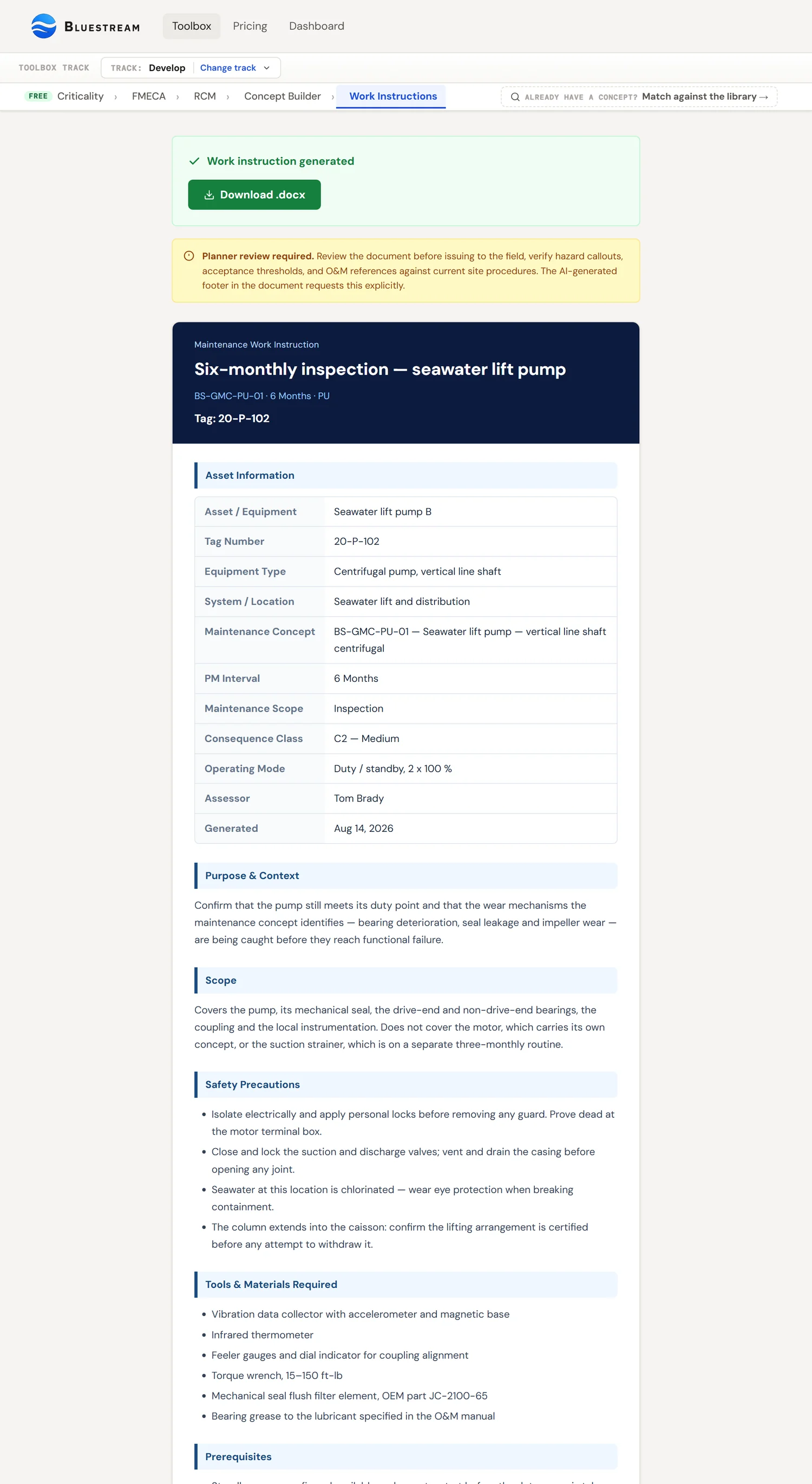
Bluestream work instructions use a structured ten-section layout: asset information header, purpose & context (why the task exists), scope, safety precautions, tools and materials, prerequisites, lubrication statement, numbered work steps with ISO 14224 failure-code prefix and per-step ✓ acceptance, reference readings table, overall acceptance criteria, reporting and close-out, two-author sign-off, and conditional disclaimers. The document design uses a dark blue header, blue-bordered section headings, green per-step acceptance lines, inline amber hazard callouts, and a clearly labelled AI-generated disclaimer. The output is a .docx file ready to attach to a CMMS job plan — the last step before the maintenance programme is operational.
What a work instruction is
A work instruction is the single-task document that tells a technician exactly how to execute one element of the maintenance programme on one asset. It is not a job plan (that is the CMMS record), not a routine (that is the library element), and not a procedure (that is the general-purpose reference). A work instruction is asset-specific, task-specific, and discipline-specific — it is written for the person with the tools in their hands at the time the work is being done.
| Artefact | What it is | Where it lives |
|---|---|---|
| Work instruction | The step-by-step document for executing one maintenance visit on one asset. Produced by the Work Instruction Generator. | Attached to a CMMS job plan; printed or shown on a tablet at the asset. |
| Job plan | The CMMS record that schedules the task at intervals. References the work instruction as an attachment. | CMMS (SAP PM, IBM Maximo, D365 Asset Management, etc.). |
| Work order | The execution instance of a job plan at a specific date. Generated automatically from the job plan's schedule. | CMMS — opens, executes, closes. |
| Maintenance routine | The library element inside a GMC. Describes the task at a reusable level. | Bluestream GMC library (see GMC Matcher guide). |
| General procedure | The reference document covering how a class of task is generally done. Company-wide. | Document-control system; referenced by work instructions, not replaced. |
The work instruction sits at the bottom of this hierarchy — it is the most specific, most short-lived, most execution-oriented of the artefacts. A work instruction for a monthly pump inspection on P-101A is good for exactly that pump doing exactly that interval's task bundle; the same monthly routine on pump P-101B needs a different work instruction (different tag, different baseline, different reference documents).
Why work instructions matter
Work instructions are where the maintenance programme meets reality. Criticality classification, FMECA, RCM, and GMC matching produce structured analysis — all of it correct, all of it auditable, all of it useless if the technician in front of the asset cannot execute on it. The quality of the work instruction determines whether the programme actually delivers the reliability gains it was designed for.
A programme with rigorous criticality classification, thorough FMECA, sound RCM task selection, and well-matched GMCs — but with poor work instructions — is a programme whose work orders get executed inconsistently. Technicians guess at torque values, skip steps that look optional, interpret acceptance criteria loosely, and the asset-reliability data that accumulates downstream is noise rather than signal. The analytical tools produce recommendations; the work instruction is what turns them into repeatable execution.
Three concrete failure modes that poor work instructions produce:
- Inconsistent execution across technicians — different people do the task differently, and the CMMS history reflects technician skill more than asset condition.
- Acceptance drift — quantitative thresholds get rounded, qualitative thresholds get relaxed, and gradually the definition of "passing" loosens until the task stops detecting the failures it was designed to detect.
- Safety near-misses — hazards that aren't called out at the exact step where they apply get missed under time pressure. The generic hazard note at the top of the document is not what keeps people safe; the step-by-step callout is.
Document structure
Every Bluestream work instruction is generated with a consistent ten-section layout. The structure is non-negotiable in the tool output because each section answers a question that a planner, a technician, or a reliability engineer needs answered at a specific point in the workflow.
The ten sections appear in execution order — the information the technician needs first appears first. The "why does this task exist" paragraph lands at the top, before the scope, because understanding why is a prerequisite for reading the rest of the document correctly.
1. Header banner & asset information
A dark blue header identifies the document (Bluestream · Maintenance Work Instruction), the generated title including the interval, the matched GMC code, the PM interval, and the asset tag number as the largest text on the first page. Directly below, a two-column asset information table captures the ten identity fields: Asset / Equipment, Tag Number, Equipment Type, System / Location, Maintenance Concept (code & description), PM Interval, Maintenance Scope (0-1 Years, 1-5 Years, 5+ Years), Consequence Class, Assessor initials, and Generated date. This is the CMMS key — every field is either a direct lookup into the CMMS asset register or a field the CMMS work-order form requires.
2. Purpose & Context — why this task exists
The Purpose & Context section answers: what failure modes does this task address, and what happens if I skip it? It names the failure modes from the FMECA, relates the task interval to the failure mechanism (the P-F interval or degradation rate), and states the consequence of skipping.
This is not a safety section and it is not a regulatory section. It is a motivation section — a two-to-four-sentence answer to "why am I here". Technicians who understand why the task exists execute it more carefully. Technicians who don't understand why treat it as bureaucratic overhead. Purpose & Context is the single highest-leverage element of a work instruction; omit it and the task becomes rote.
Typical Purpose content: the failure modes being addressed (named explicitly, e.g. "bearing wear", "backwash nozzle plugging"), the Z-008 consequence class (from Criticality), the P-F interval or failure frequency that set the task interval (from RCM), and the consequence-of-skipping statement.
3. Scope
A one-sentence statement of what the instruction covers for which asset at this interval. Purpose says why; scope says what. Kept deliberately short — the work steps carry the detail.
4. Safety Precautions
Top-of-document safety requirements that apply to the whole job: manual references (e.g. "read section 2.7 before commencing"), isolation and lockout requirements, depressurisation, fall protection, and any general PPE beyond site standard. These are the things the technician needs before starting, not step-specific hazards (those are inline at the step that creates them — see §5 below).
5. Tools & Materials Required
The complete tool kit and consumables list. Lubricants appear here with full specification (e.g. "NLGI:2 grease — Molykote Multilub, Rembrandt EP or similar"), tool sizes appear here (e.g. "13 mm socket spanner"), and measurement equipment appears here (e.g. "chain tension gauge", "calibrated torque wrench 50–250 Nm"). The technician gathers everything before starting.
6. Prerequisites
The go/no-go conditions that must be true before the first work step. Example: "Filter system isolated and depressurised", "Electrical isolation complete with LOTO applied", "Access platforms in position and secured". These are checkbox-style — if any prerequisite is not met, the work does not start.
7. Lubrication
A mandatory explicit statement. The Bluestream tool enforces one of two exact wordings at generation time: either "This asset is fitted with maintenance-free / lifetime-lubricated components. No re-greasing or oil change is required during normal service." or "Periodic lubrication is required. Use [lubricant] at [interval]. Method: [quantity and application point]. Refer to [section reference]." No middle ground. If the uploaded O&M manual does not make the lubrication requirement unambiguous, the tool asks a clarification question before generating the document. This prevents the most common work-instruction failure mode: silence on whether lubrication is required, leading technicians to either skip it or overgrease.
8. Work Steps — ISO 14224 coded, per-step acceptance
The procedural core — ordered steps, each mapping to a maintenance line from the matched GMC. Each step carries four elements:
- ISO 14224 failure-mode prefix — every step opens with the failure code it addresses, e.g.
[PLU: Plugged/Choked],[BRD: Breakdown],[SER: Minor In-service problems],[STD: Structural deficiency]. This creates a traceable link from the FMECA row through the maintenance line to the field execution step, and it becomes the ISO 14224 closing code when the technician reports the work order. - Action statement — one action per step, written so an experienced technician can execute without ambiguity and an inexperienced technician can execute with supervision.
- Per-step acceptance (✓ line) — directly under the step, a green ✓ line states the observable condition that confirms the step is done correctly. Example: "✓ All nozzle orifices are clear and unobstructed, spray pattern is uniform when tested". This per-step pattern is different from a single global acceptance section at the bottom of the document — it matches how technicians actually execute (read step, do step, record verification, move to next).
- Inline hazard callout (optional) — if the step creates or encounters a specific hazard, an amber left-thick-border callout appears immediately under the step. Used for step-triggered hazards only (pinch points, stored energy, hot surfaces, chemical exposure, residual pressure). General PPE lives in the top-level Safety Precautions section.
9. Reference Readings
A baseline-values table with one row per trendable metric — motor current draw, differential pressure, drum rotation speed, vibration overall RMS, discharge pressure, bearing temperatures. The first execution records the baseline. Subsequent executions compare against baseline and flag any significant drift. This is where condition-based maintenance meets scheduled preventive maintenance — the pass/fail acceptance is binary; the reference readings are the numbers that show drift before failure and that justify adjusting the interval.
10. Acceptance Criteria
The overall acceptance section summarises the condition of the asset at job close-out — the global pass/fail statements that aggregate the per-step ✓ lines into an asset-level conclusion. Example: "All backwash nozzles clear and providing uniform spray pattern". The per-step ✓ lines catch individual step defects; the overall acceptance criteria make the asset state auditable.
11. Reporting & Close-out
What specifically must be documented — condition of filter elements, replacements made, nozzles requiring replacement, drive chain condition, abnormal bearing conditions, adjustments made. Plus the default reporting requirements that apply to every work instruction: complete in CMMS with actual start/finish time, report defects and deviations, record ISO 14224 failure codes if corrective action was required, update equipment condition in the asset register.
12. Sign-off — two-author
Four rows: Technician name, Technician date, Reviewer name, Reviewer date. The two-author pattern is the more robust form, though it is our recommendation rather than a requirement of Z-008 — the standard asks for competent personnel and a quality-verification plan, and does not specify who signs the work document or how many times. Single-signature sign-off is the more common field practice, and the two-author form is the one we would defend in a review — and it scales down (the reviewer can be the supervisor, the maintenance engineer, or the planner).
13. Disclaimers
Two disclaimers, the first conditional. When no equipment-specific file was uploaded, a red "NO EQUIPMENT-SPECIFIC FILE PROVIDED" warning fires at the foot of the document, explicitly stating that work steps were generated from the GMC maintenance lines and general equipment-class knowledge only, and that all [OEM VALUE REQUIRED] placeholders must be verified before use. The second disclaimer always fires: an amber "AI-generated content" notice requiring planner review before the document goes to the field. The conditional disclaimer matters — it ensures the document does not misrepresent its own confidence level.
Discipline-specific content
The work instruction content differs substantially across disciplines because the failure mechanisms, the tools, the hazards, and the acceptance criteria are different. The Bluestream tool detects the discipline from the GMC routine's discipline field and tailors the generated content accordingly.
| Discipline | Typical content focus | Common acceptance criteria |
|---|---|---|
| Mechanical — rotating | Vibration monitoring, alignment checks, bearing condition, lubrication, seal condition, balance. | Vibration zones from the applicable part of ISO 10816 — part 7 for a rotodynamic pump, part 3 for a separately mounted driver; alignment tolerance ≤ X mm; oil analysis below wear-metal threshold. |
| Mechanical — static | Thickness measurement, corrosion survey, fouling inspection, gasket integrity, external visual condition. | Wall thickness ≥ minimum retirement thickness per API 510; corrosion rate < projected. |
| Electrical | Insulation resistance testing, thermography, motor current signature analysis, torque check at terminations, earthing continuity. | IR ≥ X MΩ; hotspot ΔT ≤ Y °C; earth continuity ≤ Z Ω. |
| Instrumentation | Loop calibration, sensor verification, valve stroke test, transmitter zero and span, proof test of SIS components. | Loop error ≤ 0.25% span; SIS component per IEC 61511 proof test; response time within spec. |
| HSE / barrier | Fire and gas detector function, ESDV stroke test, firewater pump function, deluge system function, alarm verification. | Barrier available on demand per Performance Standard; PS-FW-002 pass; ESDV closure time ≤ X s. |
The discipline is also passed to the model as context when it writes the Safety Precautions, so a rotating-equipment job and an electrical job come back with different hazard emphasis. Those precautions are generated text, not a lookup from a PPE table — review them like everything else the tool drafts, and set arc-flash ratings and area-specific requirements from your own site rules; an HSE function test to standard PPE plus any area-specific requirements. The tool fills these defaults from the discipline record and lets the planner override at review.
Hazard identification & PPE callouts
Hazards are called out at the step where they apply, not in a generic header at the top of the document. This is deliberate. Technicians under time pressure skim the header and read the steps; a hazard at step 3 that is documented only at the top of page 1 is a hazard that gets missed.
The Bluestream tool generates hazard callouts from two sources:
- Asset and routine context — confined-space entry if the asset is inside a vessel, energised-work hazard if the routine requires live testing, chemical exposure if the asset handles toxic media. These are inferred from the GMC routine metadata and the criticality classification.
- Step-specific risk — pinch points during guard removal, pressure during bleed-down, stored energy in springs, retained fluid in piping. These are surfaced step-by-step from the procedure logic and, where applicable, the O&M manual safety section.
Each hazard callout includes:
- The hazard type (energy, chemical, mechanical, thermal, pressure, environmental).
- The specific circumstance that creates the hazard (during this step, because of this condition).
- The control measure (PPE, LOTO, permit, standby personnel, isolation).
- The step number the callout applies to, surfaced visually beside that step.
The document does not replace the Permit-to-Work process. The hazard callouts in the work instruction are a help to the technician executing the task; they are not the facility hazard-control system. Isolation, permit and hazard control remain governed by your site PTW procedure, and the work instruction is written to be attached to a permit rather than to stand in for one. PTW review and issuance is outside the scope of the Work Instruction Generator.
Acceptance criteria — quantitative thresholds
The acceptance section is where a work instruction earns or loses its value downstream. Acceptance criteria that are quantitative and specific make CMMS history useful for reliability analysis; acceptance criteria that are qualitative or vague turn work-order history into narrative text that no one can analyse.
The Bluestream tool enforces three rules on acceptance generation:
- Quantitative wherever the task supports it. Vibration — numeric amplitude + standard reference. Temperature — numeric °C + measurement location. Thickness — numeric mm + retirement threshold. Insulation resistance — numeric MΩ at test voltage. Torque — numeric N·m + sequence. The tool prefers the quantitative form and only falls back to qualitative description when the task is genuinely observational.
- Tied to a standard or reference where one exists. the applicable part of ISO 10816 for vibration — part 7 for rotodynamic pumps, part 3 for other industrial machines — API 510 for pressure-vessel inspection, IEC 61511 for SIS proof testing, the O&M manual section number for OEM-specific criteria. The reference makes the criterion auditable — the technician can check against a durable authority, not the assessor's memory.
- Pass/fail gate explicit. Each acceptance line carries a clear "what does pass look like" definition. The technician records a result and signs off; the recorded result goes into CMMS history.
Compare acceptable and unacceptable acceptance wording:
| ❌ Weak | ✓ Strong |
|---|---|
| "Vibration acceptable." | "Overall vibration ≤ 4,0 mm/s r.m.s. at each pump bearing housing, 10–1000 Hz, two orthogonal radial directions — upper limit of Zone B, ISO 10816-7:2009 Table A.1, Category I pump ≤ 200 kW." |
| "Bearing in good condition." | "Bearing defect frequency amplitude ≤ baseline + 6 dB; no harmonics beyond the 4th order." |
| "No visible defects." | "No visible cracking, pitting, or discolouration on wetted surfaces within the inspection aperture." |
| "Seal not leaking." | "No fluid accumulation beneath the seal housing over the 15-minute observation period." |
A limit is only half the criterion. ISO 10816-7 sets two tests, and most maintenance programmes only write down the first. Criterion I is the one everybody knows: is the magnitude inside the zone? Criterion II is the change: “When an increase or decrease in vibration magnitude exceeds 25 % of the upper value of zone B… such changes should be considered significant, particularly if they are sudden” — and it applies even though the limits of zone C have not been reached.
That is the criterion a condition-monitoring programme actually lives on. A pump that has sat at 2,5 mm/s for three years and moves to 3,8 mm/s is still comfortably inside Zone B and still passes any single-number acceptance line — but it has just told you something changed. The standard’s own worked example builds an alarm exactly that way: baseline 2,5 mm/s plus 25 % of the 5,1 mm/s Zone B limit gives an alarm at 3,8 mm/s, while the trip stays at 9 mm/s.
So an acceptance criterion worth writing carries both: the zone limit for the pump’s category and rated power, and a change threshold against that machine’s own established baseline. The first tells you whether the machine is acceptable today; only the second tells you it is on its way somewhere.
The Bluestream document design
The document design is deliberate and defensible. Every element is optimised for one of three users: the planner reviewing the document before issue, the technician executing at the asset, or the reliability engineer analysing the CMMS history downstream. Every element that doesn't serve one of those users was removed.
- Dark blue header bar (#0d1b3e). Brand identity, plus the document identity (tag, task, date) at top-of-page — the fields the planner uses for filing and the technician uses to confirm they have the right document.
- Blue-bordered section headings. Every section (Asset Information, Purpose & Context, Scope, Safety Precautions, Tools, Prerequisites, Lubrication, Work Steps, Reference Readings, Acceptance Criteria, Reporting, Sign-off, Disclaimers) uses a 4-pixel blue left border on a pale blue background. Technicians can scan the document for the section they need without reading.
- ISO 14224 failure-code prefix on every work step. Each step opens with the failure code it addresses —
[PLU: Plugged/Choked],[BRD: Breakdown],[SER: Minor In-service problems],[STD: Structural deficiency]. This is the FMECA-to-CMMS traceability thread: the code on the step is what the technician enters as the ISO 14224 closing code when the work order is reported. - Green-accented per-step acceptance (✓ lines). Directly under each work step, an indented green ✓ line states the observable condition that confirms the step is complete. The colour and the tick are deliberate — per-step acceptance is the single highest-leverage formatting decision in the document because it matches how technicians actually execute (read step, do step, record verification, move on).
- Inline amber hazard callouts. Step-specific hazards appear as a compact amber-bordered strip directly under the step that creates them. Visible but not so loud that they drown out the procedure. General PPE lives in the top-of-document Safety Precautions section.
- Reference Readings table. A two-column table with one row per trendable metric, blank in the second column for the technician to fill in on each execution. Without the table, the reliability engineer has no numbers to trend; with it, each work order contributes to the failure-rate dataset.
- Two-author sign-off. Four rows (technician name, technician date, reviewer name, reviewer date) — matches Z-008-aligned execution where a competent reviewer countersigns before the work order is closed.
- Conditional red no-file-provided warning. When no O&M manual was uploaded, a red warning box fires at the foot of the document explicitly stating the document was generated from GMC maintenance lines and general equipment-class knowledge only. When a file was uploaded, the warning is suppressed. The conditional behaviour matters — the document does not misrepresent its own confidence level.
- Always-on amber AI-generated disclaimer. Clearly labelled, mandatory on every output. States that the document is AI-generated, requires planner review before issue, and that technical content must be verified against current site procedures and OEM documentation. The disclaimer is how the tool stays credible.
O&M manual integration
The asset's O&M manual is the authoritative source for asset-specific technical content — torque values, tolerance stacks, disassembly sequences, consumables lists, OEM-recommended safety notices. A work instruction that doesn't consult the O&M manual is generic; a work instruction that does consult it is asset-specific and OEM-aligned.
The manual is uploaded once in the GMC Matcher — the drag-and-drop zone accepts PDF, DOCX, TXT, MD, and RTF formats. The file persists as a fileData global across the session, so when you invoke the Work Instruction Generator from an interval card in the matched GMC, the same file is carried forward. You do not re-upload the manual.
Two upload paths are handled differently under the hood:
- PDF files are encoded as base64 and sent to the Claude API as a document block. Claude reads the PDF natively (layout, tables, diagrams) rather than relying on text extraction, which preserves tolerance tables and torque charts that text-only extraction routinely mangles.
- Text files (TXT, MD) are read into a string with the browser’s FileReader and sent as text. Faster to ingest, at the cost of any layout-dependent content the OEM relied on. DOCX is not accepted — a .docx is a ZIP archive, so reading it as text yields replacement characters rather than the manual, and the uploader now rejects any file whose first few kilobytes decode as binary rather than sending nonsense to the model. Save it as PDF instead; PDFs are read natively and keep their layout.
Size and length limits:
- PDF upload ceiling: roughly 1.5 MB (the frontend guards at ~2 MB of base64-encoded data). Larger PDFs trigger an error toast advising the user to trim to the task-relevant sections. Most single-asset O&M chapters land well under this.
- Text-file cap: 40,000 characters — but only the first 3,000 reach the model. The browser truncates a text file to the first 40,000 characters with a toast notice (
platform.js), and the generation prompt then carries only the first 3,000 of those (api/work-instruction.js). Put the maintenance-relevant chapter at the top of the file, or upload the manual as a PDF instead — a PDF is attached whole and read natively. - Asset context fields (Asset Name, Tag Number, Equipment Type, System / Location, Assessor) are free-text inputs with no strict character limit.
For each routine being rendered into a work instruction, the tool:
- Identifies the routine's task type, discipline, and the failure modes it addresses from the GMC metadata.
- Queries the O&M manual (via the Claude API call) for matching content — tolerance tables, torque sequences, safety notes, consumable specifications.
- Embeds matched content into the Work Steps and Acceptance Criteria sections of the generated document, and pulls torque values, tolerances, lubricant specifications, and page references directly from the manual into the relevant steps.
- Where the O&M manual disagrees with the generic GMC routine, the manual's OEM-specific data takes precedence for the asset-specific content.
GMC routine → work instruction handoff
The GMC Matcher identifies an applicable Generic Maintenance Concept for your asset and expands its maintenance lines into interval cards grouped by frequency (daily, weekly, monthly, quarterly, annually, etc.). Each interval card carries a "Generate WI" button. Clicking it carries forward the full context — the concept number, the chosen PM interval, the cumulative task list for that interval (including shorter-interval tasks that cascade up), the O&M manual from earlier in the session, and the equipment type — and navigates you to the Work Instruction form.
Per generation, the tool consumes:
- The GMC concept number (the matched concept for this asset).
- The chosen PM interval (the frequency of the card you clicked — daily, weekly, monthly, and so on).
- The cumulative maintenance lines for that interval — not just the lines defined at that frequency, but also the lines from every shorter interval that naturally falls inside it (see the cascading-tasks note below).
- The asset's identity from the form — name, tag, equipment type, system/location, assessor.
- The
fileDataO&M manual persisted from the GMC Matcher session. - Any clarification-round Q&A history accumulated during the generation (see §tool walkthrough).
Cascading tasks — why a monthly WI includes the weekly and daily tasks
If a technician is at the asset on the monthly visit, they should execute the monthly tasks and the weekly and daily tasks that happen to be due — otherwise you are dispatching a second visit the following week for work that could have been done on the same trip. The interval cards reflect this cascade: a monthly card shows a "+ includes N tasks carried forward from shorter intervals" annotation, and the generated work instruction includes all of them. The cumulative line list for a given interval is the union of that interval's own lines plus every shorter interval's lines.
The tool produces one .docx per interval generation. If the GMC has five frequency bands (daily, weekly, monthly, quarterly, annually) and you want work instructions for each, you invoke the generator five times — once per interval card — and the cascade means the longer intervals automatically cover the shorter ones. Each document carries its own identity, signoff block, and AI disclaimer.
docx generation pipeline
The technical pipeline behind the tool is worth knowing because it constrains what kinds of output the tool can produce reliably, and it explains the caps the user encounters in the UI.
| Component | Function | Constraint |
|---|---|---|
| File upload handler | Accepts the O&M manual from the GMC Matcher session. Accepts PDF, DOCX, TXT, MD, and RTF. | PDF: ~1.5 MB effective ceiling (base64 payload ≤ 2 MB). Text formats: 40,000-character read cap in the browser, of which only the first 3,000 characters are forwarded to the model. |
| Claude API call | Generates the purpose paragraph, the per-step actions with ISO 14224 failure-mode prefix and per-step acceptance, the overall acceptance criteria, and the reference readings list. May return a clarification question rather than a document when confidence on lubrication, OEM values, or safety isolation falls below the 90% threshold. | Returns one of two response shapes: {type:"question"} or {type:"document"}. Clarification Q&A accumulates across rounds until the document completes. |
| npm docx library | Assembles the .docx file from the structured Claude output. | Requires ECMAScript module mode — "type": "module" in package.json or the Vercel build transpiles ESM imports to CommonJS and the library breaks at runtime. |
| Vercel runtime | Hosts the API route that orchestrates the call (/api/work-instruction). |
The generator runs as a serverless function with a 60-second ceiling, set in vercel.json rather than left at the platform default. That is the budget for one generation round including the model call; if the document comes back incomplete you re-run, rather than the request continuing in the background. |
| api/deduct.js | Deducts 1 token from the user's balance on successful generation. | Transactional; if the generation fails, no token is consumed. |
The "type": "module" detail is significant. The npm docx library is distributed as an ES module. When Vercel compiles server code for serverless deployment, it needs an explicit module-type declaration in package.json; without it, the build system transpiles ESM imports to CommonJS and the docx library breaks at runtime. This is a Bluestream-specific detail that took debugging to discover and is worth being aware of if you fork the codebase.
Quality criteria — planner-ready, technician-usable
A work instruction has two primary users and one secondary user. The design has to serve all three.
The planner — first reviewer
The planner reads the document before it is issued to the field and before it is attached to a CMMS job plan. For the planner, the document must be:
- Quick to review. A document that is a chore to review will be skim-read or rubber-stamped. Bluestream’s own design target — ours, not a published benchmark — is a review that fits in a few minutes, and the output aims at one-page-per-routine density where possible.
- Flagged for AI origin. The AI disclaimer is mandatory because it tells the planner which document is in the "needs review" queue and which documents have been through human verification.
- Complete enough to act on. Missing torque values, missing reference standards, missing acceptance thresholds — any of these make the document un-approvable. The tool tries to fail visibly rather than produce incomplete output.
The technician — primary user
The technician is the person the document is really for. For the technician, the document must be:
- Executable without context-switching. If the technician has to leave the task to look something up, the work instruction has failed. Every torque, every tolerance, every reference that will be needed during the task must be embedded or cited inline.
- Scannable under time pressure. Section headings, step numbering, hazard callouts, acceptance bars — all visually distinct. The design language allows the technician to find what they need without reading the whole page.
- Honest about the hazard situation. Step-specific hazard callouts, in amber, beside the step. A technician who trusts the document will follow it; a technician who doesn't will shortcut around it.
The reliability engineer — downstream analyst
The third user is the reliability engineer who reads CMMS history six months or six years later. For them, the document must produce structured history:
- Quantitative acceptance results that go into the CMMS as numbers, not as free text. "Overall vibration 3.8 mm/s" is usable data; "vibration looked fine" is not.
- Failure-mode linkage — where a maintenance line names a failure mode, it is printed on the step so a technician can see what the task guards against. The document does not yet carry the FMECA row identifier, so the trace from CMMS history back to a specific FMECA row and on to the GMC routine is not closed: it carries the GMC concept number and the generation date, which reaches the concept but not the row. Closing that loop is roadmap.
- Revision traceability — the work instruction version the technician executed against, so history can be re-analysed against the document as it was at the time, not as it is now.
CMMS integration / exporting to job plans
The Bluestream tool produces a .docx file; the CMMS is what schedules and executes. Integration between them is an attach-and-reference pattern, not a direct API call:
- Generate the .docx via the Work Instruction Generator for each interval card you want to cover.
- Create the job plan in the CMMS — the job plan captures the schedule (interval, trigger), resource requirements (discipline, duration), and the task description. The Bluestream tool does not create CMMS records directly; the planner creates the job plan in SAP PM / Maximo / D365 / etc.
- Attach the .docx to the job plan as the primary task document. Most CMMS systems support document attachments per job plan; the .docx travels with every work order generated from that job plan.
- Link the failure codes — the work instruction carries the ISO 14224 failure codes it addresses. The CMMS job plan is configured to record those same codes when the technician closes out a work order, which is what makes the history usable for reliability analysis downstream.
This pattern keeps the CMMS as the system-of-record and the Bluestream tool as the documentation engine. No CMMS data is overwritten by the tool; no Bluestream data is lost when the CMMS changes. The attach-and-reference pattern is deliberately loose-coupled so that the Work Instruction Generator can be used with any CMMS that supports document attachments, which is effectively all of them.
Direct CMMS integration is a future roadmap item
Direct API integration with specific CMMS platforms — pushing the tailored plan and its work instructions straight into SAP PM job plans, for example — is on the roadmap for specific CMMS targets. Microsoft Dynamics 365 Asset Management is the priority target given Bluestream's Sprint365 domain. Until the integrations ship, the attach-and-reference pattern works today, for every CMMS.
How the Bluestream tool implements this
The Work Instruction Generator is Step 05, the last stop on the Develop strip of the /toolbox tool surface, after Criticality, FMECA, RCM and the Concept Builder. You can also reach it from the GMC Matcher, the Shortcut tab that sits ahead of the numbered steps: match a concept to your asset there and its maintenance lines are expanded into interval cards you can generate from directly, without walking the four analysis steps first.
The flow, end-to-end:
- Upload the O&M manual in the GMC Matcher — drag-drop into the upload zone, or click to browse. Accepted formats: PDF, DOCX, TXT, MD, RTF. A PDF is best because it is read natively by the API (layout and tables preserved); text formats are faster but layout-blind.
- Run the matcher to identify the applicable GMC. The matched concept appears in the results list; expand it to see the maintenance plan.
- Expand the matched concept to reveal the interval cards — one per frequency (daily, weekly, monthly, quarterly, annually, or whatever intervals the GMC defines). Each card shows the tasks due at that interval, and a "+ N tasks carried forward from shorter intervals" annotation when cascading applies.
- Click "Generate WI" on the interval card you want a work instruction for. The tab switches to the Work Instruction Generator with the concept, interval, and cumulative task list pre-populated.
- Fill in the asset context form — Asset Name, Tag Number, Equipment Type, System / Location, Assessor. None of these are auto-detected; they are what makes the generic GMC content asset-specific. Skipping them produces generic wording.
- Click "Generate Work Instruction — 1 token". The tool calls the API. One of two things happens:
Path A — the API asks a clarification question. The Work Instruction UI shows the question in a panel with a text-area for your answer, labelled "Clarification round 1" (or 2, 3 — the counter increments). You type your answer, the previous round's Q&A is visible in the "Previous answers" block below, you submit, and the generation retries with the accumulated history. There is no fixed limit on rounds — the API asks again whenever it cannot complete responsibly, and neither the browser nor the API caps the count. In our own use one to three rounds is typical for a well-documented asset, and more for exotic or under-documented equipment; treat that as our expectation rather than a measured figure.
Path B — the API returns the document. The browser decodes the base64 payload, builds a blob, triggers an auto-download, and switches to the "done" panel with a download button for repeated downloads and a "Generate another" button to start fresh.
One token is consumed per successful generation. Clarification rounds do not consume extra tokens — they are part of the same generation flow. If the API call fails before producing a document, the token is refunded.
The clarification round is a feature, not a failure
When the API returns a question, it is because the generation cannot responsibly complete without the answer. Typical questions: "The O&M manual does not specify whether this motor requires periodic bearing re-greasing — what is the motor frame size, or does the nameplate indicate a grease interval?" or "Is this pump Category I or Category II under ISO 10816-7, and what is its rated power? Zone B differs by both." or "The uploaded file does not specify the chain tension range for this drive — what site standard applies?" Answer as specifically as you can; the answer shapes the Lubrication statement, the Acceptance Criteria section, or the per-step acceptance lines of the output. "Not sure, use the standard default" is a valid answer and the tool will flag the missing value as [OEM VALUE REQUIRED] in the generated document.
The output is a single .docx per invocation. If the GMC has five frequency bands and you want full coverage, you invoke the generator five times — once per interval card. Periodic intervals cascade, so the longest periodic band already contains every shorter periodic band’s tasks and one generation per band covers them with no gaps. Intervals that are not a period do not cascade and never could — condition-based monitoring, run-to-failure, and anything referred out to an OEM schedule are generated on their own, and the picker labels those cards “not cascaded” so the gap is visible rather than assumed away.
Worked examples
Three interval-level generations showing how the tool produces different work-instruction content depending on the frequency and the asset.
Example 1 — Centrifugal pump bearing CBM (common case)
Mechanical rotating · 45 minBearing vibration monitoring on pump P-101A, generated from the 3-monthly interval card of the matched GMC. The 3-monthly interval on this concept has one own task (vibration monitoring) and cascades in 2 tasks from shorter intervals (weekly visual walkdown, monthly lubrication check), so the work instruction covers 3 tasks in one visit. C2/B criticality. Discipline: mechanical rotating. Asset context form: P-101A / PA-1001-A / Centrifugal Pump / Seawater Lift System / Tom Brady.
Purpose & Context paragraph: "Three-monthly bearing condition check on P-101A (DE and NDE housings). Addresses bearing-wear failure mode. The task also rolls up weekly external walkdown and monthly lubrication check to minimise dispatched visits. Skipping the task allows degradation past the P-F threshold; standby pump P-101B would then need to take duty under no-backup conditions."
Work steps generated: 11 steps across 3 task blocks (walkdown, lubrication, vibration). Each step opens with its ISO 14224 failure-code prefix —
[ELP: External leakage, process medium], [VIB: Vibration], [SER: Minor in-service problems] — and closes with a green per-step ✓ line stating the observable condition.Inline hazard callouts: 2 step-level (hearing protection while approaching the running pump; pinch hazard on coupling guard if visual inspection requires removal). Top-level Safety Precautions list: 4 items (LOTO, ear protection as site default, no loose clothing near rotating equipment, correct torque sequence on coupling bolts).
Overall Acceptance Criteria: 5 lines. "Overall vibration ≤ 4,0 mm/s r.m.s., ISO 10816-7:2009 Table A.1 Zone B, Category I ≤ 200 kW." "Bearing defect frequencies ≤ baseline + 6 dB." "Oil level between min/max on sight glass." "No audible abnormality." "No external leakage, corrosion, or loose fasteners noted on walkdown."
Reference Readings table: 4 rows (overall vibration mm/s RMS, bearing temperature DE, bearing temperature NDE, discharge pressure).
O&M manual citations: 2 (bearing spec table, lubrication grade and quantity table).
Output: 1 .docx file covering the 3-monthly visit.
This is the canonical case the tool is designed for. The GMC is well-understood, the O&M manual has clean parameter tables, the acceptance criteria map to ISO 10816-7 Table A.1 directly (P-101A is a rotodynamic pump; part 3 would govern only a separately mounted driver), and the cascading design means one visit clears three PM obligations. Generation completes inside the 60-second serverless budget described above; how long the planner then needs depends on your own review process.
Example 2 — Mechanical seal replacement (O&M-heavy)
Mechanical static · 4 hours · barrierScheduled mechanical-seal replacement on an ammonia export pump. Generated from the annual interval card of the matched GMC — this is the heaviest interval and naturally cascades monthly and quarterly tasks into the same document. C3/A, barrier-flagged (PS-PR-004), legacy pump with mismatched OEM documentation across its service history.
Round 1 Q: "The uploaded manual references Plan 11 flush but the asset context describes Plan 62 — which applies to this installation?"
Round 1 A: "Plan 62 — the seal was upgraded in 2004; disregard Plan 11 references in the old manual."
Round 2 Q: "Is a packing-presence check required before seal removal given the 2004 upgrade?"
Round 2 A: "Yes, confirm no packing present per upgrade drawing DWG-P-201-MOD-04."
Purpose & Context paragraph: "Annual scheduled replacement of the mechanical seal on P-201A (ammonia service, single-train C3/A). Addresses external leakage failure mode. Seal is a barrier element under PS-PR-004. Failure to replace on schedule risks uncontrolled ammonia release with fatality consequence."
Work steps generated: 19 steps (14 for seal replacement + 5 cascaded from monthly and quarterly intervals — vibration trend review, alignment check, seal-flush-plan integrity inspection). Each step carries an ISO 14224 failure-code prefix —
[ELP: External leakage, process medium], [SER: Minor in-service problems], [VIB: Vibration], [STD: Structural deficiency] — and a green per-step ✓ acceptance line stating the observable condition.Inline hazard callouts: 6 step-level (LOTO confirmation at the first energy-isolation step, chemical exposure to residual ammonia at the drain-and-flush step, stored-energy release at spring decompression, contamination control during seal-face handling, recommissioning pressure ramp, packing-presence verification per round 2 clarification).
Overall Acceptance Criteria: 7 lines (pre-work isolation verified, old seal removed intact, new seal face flatness within OEM tolerance, torque per O&M table T-4, Plan 62 flush loop integrity, commissioning leak test passed, vibration on restart ≤ Zone B).
Reference Readings table: 3 rows (post-commissioning vibration mm/s RMS, seal chamber pressure, flush flow rate).
O&M manual citations: 11 (OEM torque tables, Plan 62 schematic, seal-face handling procedure, commissioning sequence, multiple spec tables).
Output: 1 .docx file covering the annual visit, including cascaded tasks.
This is where clarification rounds earn their keep. The uploaded manual's generic data conflicted with the specific asset's modification history; without the two rounds of Q&A, the generated instruction would have referenced the wrong flush plan and missed the packing-presence check — both errors that a field technician might not have caught. The clarifications are logged in the document footer so the planner reviewer sees what was asked and what was answered.
Example 3 — PSV function test (failure-finding)
HSE barrier · 2 hours · FF task3-yearly bench function test of a spring-loaded PSV on a hydrocarbon separator. Generated from the 3-yearly interval card of the matched PSV GMC. This is a failure-finding task — the purpose is to confirm the PSV will lift at set pressure when demanded, not to prevent degradation. A hidden failure from the FMECA: no in-service detection. C3 barrier, PS-HC-001. The 3-yearly interval is the only frequency on this GMC (PSVs are not routinely inspected in service), so no cascading applies.
Round 1 Q: "Should the reseat pressure threshold be set - 4% per default or does site procedure specify a tighter tolerance for sour-gas service?"
Round 1 A: "Site procedure applies - 7% tolerance for sour-gas; use that."
Purpose & Context paragraph: "Three-yearly bench function test of PSV PSV-501A. Confirms the valve lifts at ≤ set pressure + 10% tolerance and reseats within the site-specific - 7% band for sour-gas service. Hidden failure — no in-service detection. Failure of this barrier removes the last line of defence against separator overpressure. Performance Standard PS-HC-001 and regulatory requirement mandate function testing at ≤ 3-year interval."
Work steps generated: 9 steps (remove from service, bench setup, pressure ramp, record lift pressure, record reseat pressure, inspect seat and spring, replace if out of tolerance, commissioning test at site, return to service). Each step carries its ISO 14224 failure-code prefix —
[FTC: Fail to close on demand], [FTO: Fail to open on demand], [STD: Structural deficiency] — and a green per-step ✓ acceptance line.Inline hazard callouts: 4 step-level (residual process fluid on PSV during removal, bench test pressure at the ramp step, spring decompression if disassembly needed, site reinstallation LOTO verification).
Overall Acceptance Criteria: 4 lines (lift pressure within set + 10%, reseat within set - 7% per clarification, no visible damage to seat or spring, post-install seal integrity).
Reference Readings table: 3 rows (measured lift pressure barg, measured reseat pressure barg, blowdown percentage).
O&M manual citations: 6 (OEM bench-test procedure, set-pressure table, tolerance bands, disassembly sequence, inspection criteria, reassembly torque).
Output: 1 .docx file for the 3-yearly visit.
The failure-finding nature of this task is made visible in the Purpose & Context paragraph — the task is not preventive, it is detective. The per-step ✓ acceptance lines and the overall Acceptance Criteria are the test pass/fail thresholds, which go into CMMS history as numerical records. Six years of such records provide the evidence that the PSV population is still within tolerance, or that the maintenance programme has drift that needs correction.
Common pitfalls
Six work-instruction errors that recur across projects. Most of them are about where effort gets invested — the temptation to optimise for the reviewer rather than the end user.
1. Writing for the planner, not the technician
It is easy to write a work instruction the planner will approve and the technician will ignore. Dense engineering prose, extensive rationale, standards citations on every line — all of this makes the planner confident and the technician frustrated. The technician is the real reader; the planner is the gatekeeper. Optimise for execution, not approval.
2. Skipping the Purpose & Context section
The Purpose & Context paragraph looks redundant — "the technician doesn't need to know why, they just need to do it." That is wrong in practice. Technicians who understand why the task exists will execute it carefully and flag anomalies; technicians who don't will execute rotely and miss signals. The paragraph takes two-to-four sentences and pays for itself on every work-order execution. The Bluestream generator forces the field to be populated; do not strip it during planner review.
3. Qualitative acceptance ("looks OK")
Qualitative acceptance criteria mean the definition of passing drifts over time. Across hundreds of work-order executions, "looks OK" becomes whatever the current technician's threshold is, not the threshold the task was designed to enforce. Every acceptance criterion that can be numerical should be numerical; every numerical criterion should carry a standard reference; every acceptance line should produce a recordable result.
4. PPE callouts as afterthought
PPE callouts in the header ("standard PPE applies") are effectively invisible once the task starts. Step-specific hazard callouts at the step where the hazard applies are the useful form. Ear protection is called out at the step where the technician approaches the running pump, not in a block at the top that the technician scrolled past before reaching the asset.
5. Treating AI output as final — no planner review
The AI-generated disclaimer is not a decoration; it is a contract. The tool's output is a first draft that must be reviewed before it is issued to the field. Rushing to attach AI-generated work instructions to CMMS job plans without planner review is the fastest way to discredit the entire programme when the first error surfaces. Every output needs a human sign-off before it goes live.
6. Decoupling from the O&M manual
A work instruction that does not consult the asset's O&M manual is generic. Generic work instructions fit OEM-average assets; real assets have OEM-specific tolerances, torques, sequences, and consumables. Attach the O&M manual where you have one. A PDF is read natively, so there is no need to pre-filter it; only plain-text uploads are truncated, at 40 000 characters. Skipping the manual produces work instructions that are correct on paper and wrong in the field.
References
- ISO 14224:2016 — Petroleum, petrochemical and natural gas industries — Collection and exchange of reliability and maintenance data for equipment. The failure-code spine that links work instructions to downstream reliability analysis.
- ISO 55001:2014 — Asset management — Management systems — Requirements. Parent framework into which work-instruction management fits.
- EN 13306:2017 — Maintenance terminology. European vocabulary for maintenance. It defines the terms this tool works in — maintenance plan (2.5), required function (2.6), preventive and corrective maintenance (7.1, 7.9) — though not “work order” or “job plan”, which are CMMS conventions rather than defined terms.
- ISO 10816-7:2009 — Mechanical vibration — Evaluation of machine vibration, Part 7: Rotodynamic pumps. Standard reference for vibration-based acceptance criteria.
- IEC 61511:2016 — Functional safety — Safety instrumented systems. Reference for SIS-related work instructions and proof testing.
- API 510 / 570 / 653 — Inspection codes for pressure vessels, piping, and aboveground tanks respectively. Standard references for static-equipment acceptance.