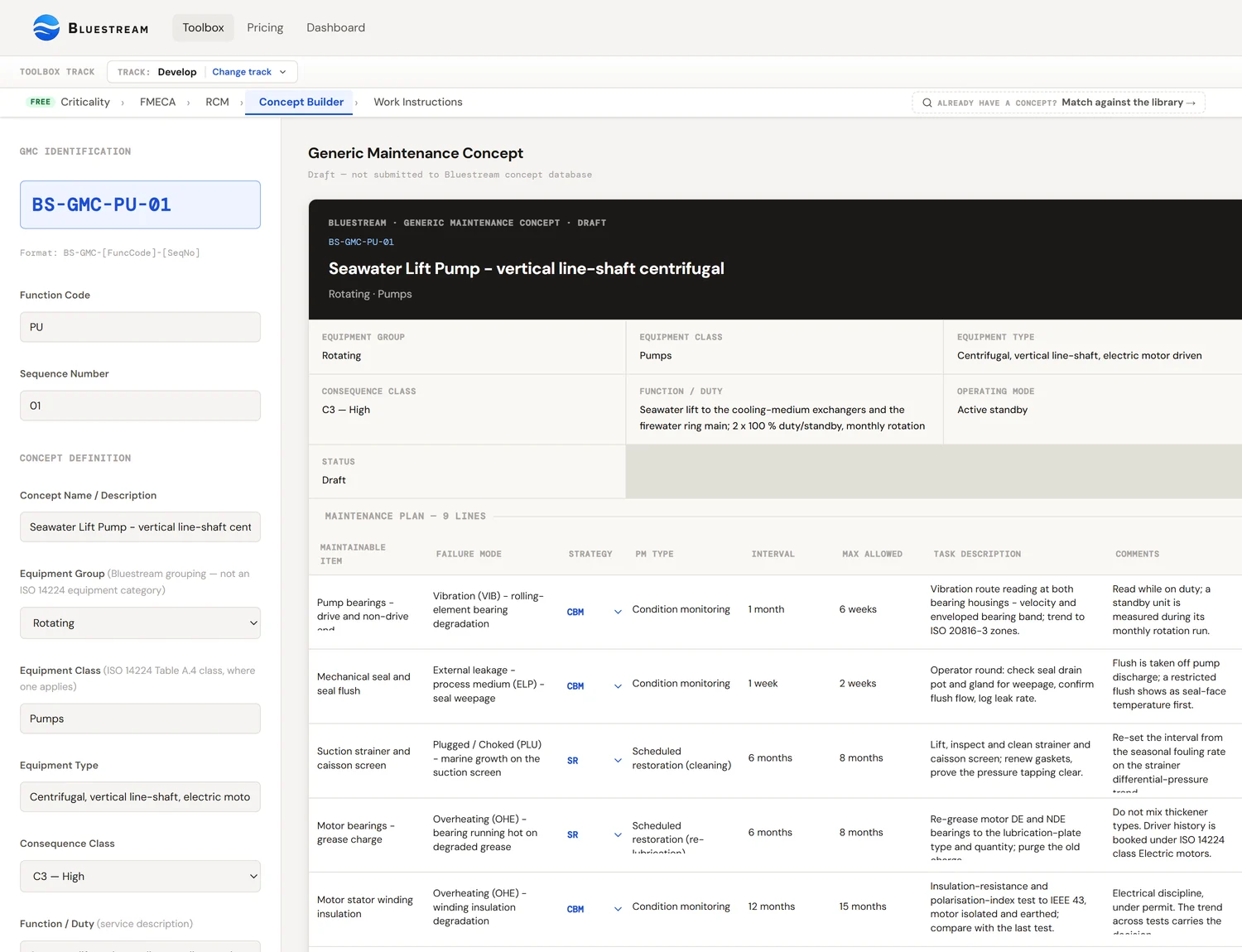
A Generic Maintenance Concept (GMC) is a reusable maintenance-programme template for a specific equipment type and criticality combination. Instead of engineering a bespoke plan for every pump on the facility, you build one good GMC for "centrifugal pump, continuous duty, C2/B redundancy" and apply it to every pump that matches those parameters. The GMC captures the task list, intervals, resource requirements, acceptance criteria, and spare-parts strategy — keyed to a Bluestream equipment classification that borrows ISO 14224's class names.
The Bluestream GMC Matcher takes the RCM output from Tool 3 and picks the best-fit GMC from a library of 206 templates — 199 of which are marked Available and offered as candidates; the rest are retired or still being written, and the matcher will not return them. The output is a tailored maintenance plan ready for the Work Instruction Generator (Tool 5), which turns each task into a discipline-specific work-instruction document.
What a Generic Maintenance Concept is
A Generic Maintenance Concept (GMC) is a reusable, standards-aligned maintenance-programme template — a complete set of tasks, intervals, acceptance criteria, resource requirements, and reference documents — associated with a specific equipment type and criticality combination. Apply it to any asset that matches those parameters and you have a coherent maintenance plan, immediately, without starting from a blank sheet.
The GMC captures everything the maintenance organisation needs to execute on that class of asset:
- Task inventory — every preventive, predictive, and failure-finding task the asset should receive.
- Intervals — calendar, operating hours, or usage-based, derived from the RCM decision tree.
- Resource requirements — discipline (mechanical, electrical, instrumentation), specialist tools, permits.
- Acceptance criteria — quantitative thresholds per task (vibration < X mm/s, insulation resistance > Y MΩ).
- Reference documents — the standards and OEM manuals each task derives from.
- Spare-parts strategy — which spares to hold, at what stock level, in which location.
A GMC is not a specific work order on a specific asset. It is the template from which specific work orders are generated, by attaching the GMC to a concrete asset in the CMMS and letting the scheduling engine create work-order instances at the interval the GMC specifies.
The word "generic" in GMC means reusable, not watered-down. A high-quality GMC is better than most bespoke plans — it has been reviewed by multiple engineers, debugged against multiple asset populations, and refined against operating data. Bespoke plans are typically written once, never reviewed, and reflect whatever assumptions the original engineer held. Reuse of a good GMC is a quality move, not a shortcut.
Why GMCs exist — the reuse economics
A typical offshore production platform has 5,000–15,000 tagged maintenance items. A typical aquaculture facility has 800–2,000. The dominant cost of building a maintenance programme from scratch is not the tooling — it is the engineering hours per asset. On our own scoping figures — not an industry benchmark — engineering from a blank sheet runs 2–6 hours per asset depending on criticality; at 10,000 assets that is 20,000 to 60,000 engineering hours. Substitute your own rates: the ratio below holds even where the absolute numbers do not.
GMCs break this cost structure by changing what is engineered. You engineer once, per equipment-class-and-criticality combination, and apply N times. For most operating facilities, the number of unique combinations is measured in the low hundreds even when the asset count is in the thousands:
| Facility size | Assets | Unique GMCs needed | Engineering hours (bespoke) | Engineering hours (GMC) |
|---|---|---|---|---|
| Small O&G platform | 2,000 | ~80 | 8,000 | 1,200 |
| Large O&G platform | 12,000 | ~150 | 48,000 | 3,500 |
| Mid-size aquaculture site | 1,500 | ~60 | 6,000 | 900 |
The numbers above are ours, not a published benchmark: they assume 4 engineering hours per bespoke plan and 15 hours per GMC (GMCs are more expensive to engineer individually because each needs to cover a population of assets). The saving scales with asset count; the more assets share a GMC, the better the ratio gets.
The saving is not only in hours — it is in consistency. Fifty centrifugal pumps on the same facility, all managed under the same GMC, will receive the same tasks at the same intervals with the same acceptance criteria. Fifty pumps each managed under a different bespoke plan drift apart over time as different engineers update each plan differently. The GMC approach makes the maintenance programme auditable at the population level — an auditor can look at the GMC once and know what is happening on every asset it governs.
GMC vs asset-specific maintenance plan
A GMC is a template; an asset-specific maintenance plan is what the CMMS actually executes against a specific tag number. The relationship is many-to-one: one GMC governs many assets. But not every asset fits a GMC cleanly, and not every GMC applies to every asset that shares its equipment type. Knowing when to match and when to tailor is the core judgement call.
| Dimension | GMC | Asset-specific plan |
|---|---|---|
| Scope | One equipment type + criticality combination. | One specific tag number. |
| Reuse | Applied to many assets. | Applies to one asset. |
| Engineering effort | High per GMC; amortised across N assets. | Moderate per plan; not amortised. |
| Change control | Library-level — one change propagates to all using assets. | Per-asset — each plan updated individually. |
| Live in CMMS as | Job-plan templates / strategy groups. | Concrete job plans attached to specific tags. |
In a mature programme, the asset-specific plan is a tailored instance of a GMC, not an independent plan. The CMMS holds the GMC as the master and the asset-specific plan as a derived record with delta fields — the interval was shortened because this specific pump has a history of frequent failures, or the acceptance criterion was tightened because this specific unit is on safety-critical duty. Everything not in the delta inherits from the GMC.
GMC library structure — concepts / routines / lines
The Bluestream GMC library is stored in three linked tables in the platform database. Understanding the hierarchy matters because it explains how small changes in the library propagate into thousands of executed work orders.
| Level | DB table | Current count | What it holds |
|---|---|---|---|
| 1. Generic Maintenance Concept | concepts | 206 | One row per equipment-type + criticality combination. Concept number, function code, description, equipment group, discipline, equipment category / class / type, functional mode, consequence class, status. |
| 2. Maintenance routine | maintenance_routines | 499 | A single task belonging to a GMC. Task type (CBM, SR, SD, FF, RTF), interval, discipline, estimated duration. |
| 3. Maintenance line | maintenance_lines | 290 | A specific instruction step within a routine. "Measure overall vibration at bearing housings DE and NDE, compare to ISO 10816-7 Table A.1 Zone B limits for the pump’s category and rated power." Granular enough to render into a work instruction. |
The reuse multiplier is what makes the library worth building. The 206 concepts carry 499 maintenance routines — about 2.4 routines per GMC — so each GMC, applied to N assets, generates N × 2.4 routine instances in the live maintenance programme: a library of 206 GMCs applied across 10,000 assets yields roughly 24,000 routine instances in the CMMS, all inheriting from the 499 master routines. The third level is still being filled in — 290 maintenance lines exist today, covering 92 of the 206 concepts — so the granular instruction text is not yet in place for every GMC.
Equipment classification — and where ISO 14224 actually applies
The classification the library stores is Bluestream's own; ISO 14224:2016 supplies part of the vocabulary but is not the key. Each concept row carries an equipment category (Machinery, Mechanical Equipment, Electrical Equipment, Safety and Control Equipment), an equipment class name, an equipment type, a functional mode and an equipment group — all as plain text. Many of the class names are taken straight from ISO 14224 Table A.4 (Pumps, Compressors, Heat Exchangers, Valves, Electric Generators, Power transformers, Control Logic Units, Telecommunication); others — Fiscal Metering, Fresh Water Maker, Electrochlorination Package, Hydrocyclone skid — have no Table A.4 counterpart. The library stores the class name, never the two-letter ISO 14224 class code: there is no PU, CO or HE in it. The letters in a concept number such as BS-GMC-PA-01 are a tag function code, not an ISO 14224 equipment class code.
Why lean on ISO 14224 vocabulary at all, rather than OEM model numbers or company-specific tag conventions:
- It is the vocabulary the FMECA tool already uses — Tool 2 asks for an ISO 14224 function code and maps it to a Table A.4 equipment class in order to offer the right Annex B failure-mode codes, so the terms are already familiar. The GMC library carries no ISO 14224 code, so nothing is handed over automatically: you re-enter the equipment description in the Matcher.
- It is stable across vendors — a centrifugal pump is class PU whether it's KSB, Sulzer, or Flowserve.
- It aligns with failure-code reporting — the CMMS failure history uses the same codes, so the library can be benchmarked against real operating data.
- It is regulator-recognised — Norwegian continental shelf operators report failure data to OREDA in ISO 14224 format, so any GMC library aligned to it is immediately compatible.
The classification is four levels deep: equipment category → equipment class → equipment type → functional mode. Machinery → Pumps → Centrifugal is one concept family; Mechanical Equipment → Heat Exchangers → Shell and tube is another. There is no ISO 14224 subclass field and no maintainable-item level in the library, and no rule that prefers a narrower entry over a broader one — the four fields are stored as plain text and nothing below equipment type is modelled.
How the GMC Matcher picks from FMECA output
The Matcher is a single pass over the concept library. You give it an equipment type, optionally a function code, free-text notes and optionally a document; it reads the library — concept number, description, equipment group, equipment type, functional mode — and returns the five closest concepts, each with a confidence percentage and a written rationale for why it matched. It is a lookup with judgement, not a scoring engine: there is no weighted formula behind the number, and the criticality class and redundancy from Tool 1 are not inputs to it.
Inputs the matcher uses for scoring:
- Equipment type, function code and free-text notes — the three fields you type in. There is no ISO 14224 equipment-class filter: the complete concept list is put in front of the model, which ranks it on functional similarity, so no GMC is excluded before ranking.
- Criticality class from Tool 1 — C1, C2, or C3. This is not what selects the concept, and it is worth being clear why. Z-008 §C.4 says one GMC applied to items of different consequence class gives different activities and intervals, and Annex D shows a single concept carrying a “maintenance interval per consequence class” column. So the class picks the interval column inside the concept, not the concept itself. The Matcher does not read it today; you apply it when you set intervals in the Concept Builder.
- Redundancy class — RED-A, RED-B, or RED-C from the Criticality Classification. Redundancy affects the right failure-finding interval and the acceptable run-to-failure decisions.
- Operating context features — service fluid, duty cycle (continuous vs standby vs emergency), environment (indoor / outdoor / subsea / offshore).
- Industry — O&G, aquaculture, power, process. Industry-specific libraries override cross-industry defaults where they exist.
- RCM decision-tree outcome — which task types the asset actually needs (CBM, SR, SD, FF, RTF, RED). The matcher prefers GMCs whose routine set matches the needed task set.
Tailoring a GMC to a specific asset
A GMC is a template; the tailored plan is the instance applied to a specific asset. Tailoring is the step that turns generic into specific, and it is where the Bluestream tool earns its keep over a manual library-matching exercise.
The tailoring step consumes four inputs:
| Input | Source | What it contributes |
|---|---|---|
| The selected GMC | From the Matcher step above. | Task list, intervals, acceptance criteria, reference documents — the backbone. |
| The asset's O&M manual | Uploaded by the user as PDF. | OEM-specific intervals, lubricants, tolerances, torque values, safety notices that deviate from the generic defaults. |
| The operating context | From Tool 1 Criticality Classification. | Service fluid, duty cycle, environment, performance requirements. |
| Engineering overrides | Optional, user-entered. | Known-specific deviations — this pump has 20% more vibration at baseline than OREDA; this valve's spring is replaced every 3 years not 5. |
The O&M manual is where OEM specifics enter, but it enters later than this section used to claim. The uploaded PDF is carried forward to the Work Instruction Generator, which reads it when it writes the steps — there is no separate extraction pass that rewrites the GMC fields into a structured override record. Where the O&M manual disagrees with the generic GMC (often it does — the OEM has knowledge the generic template cannot), the manual should win — but you apply that yourself when you set the plan rows, and record the page reference in the concept rationale. There is no tailoring step and nothing logs the deviation for you.
Why the O&M manual is the right authority for tailoring
The generic GMC is engineered against industry-average data (published reliability datasets, ISO 14224 benchmarks, vendor surveys). The O&M manual is engineered against the specific design of the specific asset — the manufacturer's actual tolerance stack, their fatigue-life calculations, their warranty conditions. When they disagree, the manual is the more authoritative source for that individual asset. The generic GMC is only authoritative for things the manual does not cover.
A key input that carries through the tailoring is the PDF itself. In the Bluestream platform, the uploaded O&M manual is held in a fileData global that persists through the session — so the Work Instruction Generator (Tool 5) can read the same PDF when building each task's instruction steps. The user uploads the manual once; both tools consume it.
Handoff to the Work Instruction Generator (Tool 5)
The tailored plan produced by Tool 4 is the direct input to the Work Instruction Generator (Tool 5). The handoff is automatic inside the platform — when you progress from "Match and tailor GMC" to "Generate work instructions", the tailored plan is passed forward as structured data; you do not re-enter anything.
What flows through:
- Every maintenance routine in the tailored GMC — one input record per routine for Tool 5.
- The routine's maintenance lines — the granular instruction steps that Tool 5 will render into a work-instruction document.
- The O&M manual PDF — persisted as
fileDatafor Tool 5 to consult per routine. - Asset metadata — tag number, equipment class, criticality, operating context.
- Acceptance criteria — quantitative thresholds that Tool 5 embeds in the instruction output.
Tool 5 takes each routine and produces a discipline-specific work-instruction document in the Bluestream format (dark blue header, blue-bordered headings, green acceptance lines, AI disclaimer). For a typical maintenance programme build, Tool 4 runs once per asset; Tool 5 runs once per routine within the tailored plan, producing one work-instruction document per routine.
Tool 5 requires Tool 4 to run first. The Work Instruction Generator is the last step in the chain — it needs the tailored plan as input, and it reads from the same fileData that holds the O&M manual. Running Tool 5 without Tool 4 context produces generic instruction output not tailored to any specific asset.
Industry-specific GMC libraries
The 206-GMC library is general-purpose. Real industries have distinctive failure mechanisms, regulatory requirements and operating patterns that deserve their own variants, and splitting the library that way is on the roadmap. Today there is one library and no industry selector, so an industry-specific concept is something you build by adapting a general one. The industries we expect to split out first:
| Industry | What changes | Example |
|---|---|---|
| Oil & Gas (offshore & onshore) |
NORSOK Z-008:2024 consequence classes; industry population failure rates; barrier element tagging per ISO 17776; PSV and SIF-specific failure-finding routines. | Firewater pump GMC carries a 3-month function-test routine (SAE JA1012 failure-finding) and PS-FW-002 performance-standard link; the generic pump GMC does not. |
| Aquaculture (cage & net-pen) |
Biological-contamination cleaning cycles, fish-welfare-sensitive scheduling, seasonal operating patterns (smolt transfer, harvest windows), automation-specific GMCs for feeders and cameras. | A feeder GMC includes biofouling inspection cadence keyed to water temperature and growth phase, not calendar-only. |
| Process industries (refining, petrochem, LNG) |
API 510/570/653 inspection integration; corrosion-under-insulation routines; RBI-aligned intervals; turnaround planning linkage. | Piping inspection GMC integrates with RBI output for thickness-measurement frequency, not the generic calendar default. |
| Power & utilities (generation, transmission) |
NERC/IEEE compliance tasks; grid-reliability performance metrics; generator-specific overhaul cadences; protection-relay scheme test routines. | Transformer GMC includes dissolved-gas analysis cadence and furanic-acid sampling, absent from the generic electrical-asset library. |
Industry-specific libraries extend the general-purpose library rather than replacing it. A pump GMC may inherit 80% of its routines from the generic library and add 20% industry-specific routines for its service. The Matcher scores industry-specific GMCs higher than general-purpose GMCs when the industry field matches, so the industry library is picked in preference.
New industries are added to the library as Bluestream engages with clients in that sector. The O&G library is the most mature; aquaculture is the newest addition (driven by the Cermaq engagement on Atlantic salmon CMMS implementation).
Version control & change management
A GMC library is a living asset. Operating data accumulates, published reliability datasets update, standards revise, incidents teach lessons — every one of these is a trigger to update GMCs in the library. Because a single GMC governs maintenance on many assets, change control matters more for the GMC library than for any individual asset plan.
The library is not versioned yet — a concept you match today carries no library revision, so a study cannot currently record which library state produced it. That matters for auditability, and versioning it is on the roadmap. The scheme we intend:
| Version bump | Trigger | Impact |
|---|---|---|
| Major (X.0.0) | Breaking change — equipment-class code changed; criticality band redefined; task-type codes restructured. | Existing tailored plans must be re-matched. Rare — typically tied to a standards revision (e.g., Z-008:2017 → 2024). |
| Minor (X.Y.0) | New GMC added, existing GMC materially extended (new routine, changed interval). | Existing assets on unchanged GMCs are not affected. Assets on extended GMCs need a tailored-plan regeneration. |
| Patch (X.Y.Z) | Text correction, reference-document update, acceptance-criterion clarification. | Propagates automatically; no regeneration needed. |
Every GMC carries the library version it was published under and the date of last review. Tailored plans carry both the library version they were matched under and the GMC version within the library. When the library is upgraded, the platform flags tailored plans that were built against older GMC versions and offers a re-match — accepting the re-match is opt-in, so you are never silently changed out from under.
How the Bluestream tool implements this
Tool 4 on /toolbox is a two-step workflow: match, then tailor. The sidebar captures the inputs; the main panel shows the matcher output and the tailoring form.
Required inputs:
- Asset information — name, tag number, equipment class (pre-filled from Tool 1 if you came through the sequence).
- Criticality classification — C1/C2/C3 + RED-A/B/C (pre-filled from Tool 1).
- Operating context — service fluid, duty cycle, environment (pre-filled from Tool 1).
- RCM task-type requirements — the task types recommended by Tool 3 (pre-filled from Tool 3).
- Industry — O&G, aquaculture, process, power (picker).
- O&M manual — optional. A PDF is read natively; a plain-text file is truncated at 40 000 characters.
- Engineering overrides — optional text field for known deviations.
Click Match GMC to run the matcher. The output panel shows the top candidates with confidence percentages, the recommended selection, and a rationale summary for why the top candidate won. Accept the recommendation or pick a different candidate — your call.
Once a GMC is selected, open the Concept Builder and work through the plan rows: the routines, their intervals, the discipline that carries each one, and the acceptance criteria. This is where your judgement goes in — the tool assembles and records the concept, it does not tailor it for you, and there is no separate tailoring action to click. The tailored plan is the input to the Work Instruction Generator (Tool 5) — progress directly to Tool 5 from the output screen.
Worked examples
Three asset-and-GMC combinations showing how the matcher and tailoring logic land in different situations.
Example 1 — Centrifugal pump, clean library match
Fit 0.94 · Library GMC PU-CF-02A produced-water injection pump, API 610 OH2, continuous duty, offshore, 2×100% redundancy. Classified C2/B in Tool 1; FMECA in Tool 2 identified bearing wear, seal wear, and impeller fouling as the credible failure modes; RCM in Tool 3 recommended CBM for bearing wear, scheduled restoration for seal wear, and condition-based monitoring for impeller fouling via pump performance trending.
Criticality input: C2/B.
Industry: O&G, offshore.
O&M manual: uploaded, 42 KB PDF (KSB-issued).
Candidate filter: 14 GMCs match equipment class + criticality.
Top match: 94 % confidence — GMC PU-CF-02 (centrifugal pump, continuous duty, C2 redundant).
Tailoring applied: bearing lubrication interval shortened from 12 months (generic) to 9 months (O&M manual says 8,000 hrs ≈ 9 months for this duty). Seal-inspection interval aligned to O&M-specified 18 months. Impeller-clearance tolerance tightened from generic 0.4 mm to 0.3 mm per the OEM tolerance table.
Routines generated: 6 (bearing CBM, bearing lube, seal inspection, impeller inspection, performance trend, overall condition walkdown).
Handoff to Tool 5: 6 work-instruction documents will be generated.
This is the canonical clean-match case. The library has a well-engineered GMC for exactly this equipment type and duty; the O&M manual contributes three tailoring deviations (all more conservative than the generic defaults); the tailored plan is ready for work-instruction generation in under a minute of user time.
Example 2 — Mechanical seal replacement on a legacy pump
Fit 0.71 · Library GMC SE-MC-01 + heavy tailoringA mechanical-seal replacement task on a 1997-vintage ammonia pump. The pump is still in service, the original manufacturer no longer supports it, and the seal assembly has been upgraded three times over its service life to different OEM designs. Classified C3/A (single-train ammonia export); Tool 3 recommended scheduled seal replacement every 4 years.
PU). Classify the pump and carry the seal as the maintainable item.Criticality input: C3/A.
Industry: O&G, onshore.
O&M manual: uploaded, 55 KB PDF — but from the latest seal OEM, not the original pump OEM.
Candidate filter: 4 GMCs match equipment class + criticality.
Top match: 71 % confidence — GMC SE-MC-01 (single mechanical seal, critical service). Lower fit than typical because the library GMC assumes matched pump+seal OEM documentation; this case has mismatched documentation.
Tailoring applied: heavy. Safety barrier flag set (ammonia service, toxic). Torque values substituted from current-seal-OEM manual. Flush-plan verified from current-seal-OEM data (Plan 62 not the legacy Plan 11). Previous-failure notes from CMMS history added as context. Two manual-override fields populated: "confirm packing not present (upgraded from packing to seal in 2004)" and "confirm Plan 62 flush loop integrity".
Routines generated: 4 (pre-work isolation & preparation, seal removal, new seal installation, post-work commissioning test).
Handoff to Tool 5: 4 work-instruction documents with barrier-safety-critical flag.
This case shows the value of the tailoring step. The generic GMC gets you the structure (isolation, removal, installation, recommissioning) but cannot know the history of this specific pump. Tool 4 captures the deviations, logs them with page references to the O&M manual, and flags the barrier-safety context. Without the tailoring step, the generic GMC would generate work instructions that reference the wrong seal OEM, wrong flush plan, and miss the "no longer a packing" check that is specific to this pump's modification history.
Example 3 — Subsea control module, no library match
No match · Engineered GMC pathA subsea control module (SCM) on a wellhead. Custom-built for this field; not a catalog item. Houses hydraulic and electrical control of the subsea tree. ROV-accessed only; service life of 25 years with in-situ maintenance via ROV. Classified C3/A; the matcher finds no library GMC that credibly fits.
VA, under Safety and control — there is no separate control-valve or actuator class, and the actuator and positioner are maintainable items within it. Classify as VA and record the actuator at the level below.Criticality input: C3/A.
Industry: O&G, subsea.
O&M manual: uploaded, 58 KB PDF (installation-specific dossier).
Candidate filter: 0 GMCs match at credible fit (> 0.5).
Top candidate: VL-SB-01 (subsea valve, C3) at 34 % confidence — rejected as insufficient.
Engineered GMC path: matcher redirects to an engineered-plan workflow. The user builds a new GMC for this asset class, drawing on the O&M manual as the primary source. The engineered GMC is tagged as "single-use" and not added to the library unless the user explicitly promotes it.
Routines generated: 8, all hand-engineered (hydraulic-circuit function test, electrical continuity test, ROV-camera visual inspection, SIT connector check, and four specialist tests from the O&M manual).
Handoff to Tool 5: 8 work-instruction documents with subsea-specific discipline tagging.
This case illustrates what happens when the library is too shallow. Subsea equipment is not covered in the 206-GMC library — it holds no subsea tree, manifold, umbilical, control-module, riser or flowline concept — so none of the candidates the matcher returns is a credible fit and the engineered-plan workflow takes over. The user spends more time — because nothing is being reused — but the tailored plan that results is specific to the asset and the O&M manual. When Bluestream subsequently adds a subsea library, cases like this one are the source material.
Common pitfalls
Six GMC-matching errors that recur across projects. Most come from treating the library as static or from skipping the tailoring step because "it looked close enough".
1. Accepting the library match without tailoring
The matcher returns five ranked candidates, each with a confidence percentage and a written rationale. A confidence of 94 % is a strong match — it still means the GMC has to be adapted to this specific asset. Accepting the generic GMC as-is and skipping the tailoring step produces work instructions that are correct for a generic pump but not for your pump. The O&M manual upload and the override fields are not optional; they are how the library becomes applicable to your assets.
2. Treating a low confidence as a library failure
A confidence in the 50–70 % band is not a failed match — it is a partial one that needs more adaptation. Below 50 % the library probably does not cover this asset, and building the plan from your own FMECA and RCM beats forcing a poor match. The model is told to be conservative with the number: a strong functional match scores 80–90 %, an exact match on type and application 90–95 %, and anything inferred sits below 50 %. Know the difference. The threshold is at the matcher level, not at the user's discretion.
3. Over-specialising the library
The instinct to build a GMC for every variant (pumps by OEM, by horsepower band, by service type, by install decade) produces a library that is too narrow to match anything. A library of 2,000 GMCs where each governs 5 assets is worse than a library of 200 GMCs where each governs 50 assets — the reuse multiplier that makes the library valuable is lost. Engineer GMCs at the equipment-class-plus-criticality level; handle the specialisation in the tailoring step.
4. Letting the library rot
A library not reviewed for two years has drifted away from the operating reality. Task intervals tuned against 2022 operating data are approximately wrong by 2026. Incidents teach lessons that should be encoded into GMCs. Schedule annual library reviews, act on them, bump the version number. A stale library is worse than no library because it creates false confidence.
5. Ignoring the O&M manual when it exists
The O&M manual upload is required for tailoring; skipping it leaves the generic GMC unmodified. Some operators skip the upload because "the manual is in our document control anyway". That is not the same as letting the tool read it. The Bluestream tool cannot consult external document-control systems; it can only consult files uploaded into the session. Upload the manual every time — or lose the tailoring value.
6. Mismatching industry and library
The library is general-purpose and carries no industry dimension, so the matcher will happily return the nearest functional cousin from another industry, producing a confidence that looks respectable but that ignores industry-distinctive failure mechanisms. An aquaculture feeder matched against the generic electrical-motor GMC will receive cadence recommendations that are calendar-based, not keyed to fish-growth phase. Always set the industry field correctly; if the industry library does not cover the asset, that is a library gap to flag, not a mismatch to ignore.
References
- ISO 14224:2016 — Petroleum, petrochemical and natural gas industries — Collection and exchange of reliability and maintenance data for equipment. The equipment-classification spine of the GMC library.
- NORSOK Z-008:2024 — Risk based maintenance and consequence classification. Defines the criticality bands that the GMC library is keyed against.
- ISO 55001:2014 — Asset management — Management systems — Requirements. The asset-management framework into which the GMC library fits as a reusable maintenance-strategy artefact.
- EN 13306:2017 — Maintenance terminology. European standard vocabulary for maintenance-programme terms used across the GMC library.
- OREDA Handbook — Offshore and onshore reliability data handbook. The industry reference for population failure rates in offshore oil and gas.